
Introduction
Creating a website is just the first step in building an online presence. To attract visitors and turn them into customers, you need to optimize your site for search engines. SEO, or search engine optimization, is a set of strategies and techniques designed to improve your website’s visibility in search engine results. When done correctly, SEO can drive thousands of visitors to your site each month, helping to grow your business and increase sales.
Step 1: Set Up Your Website
Choose a Platform
Choosing the right platform for your website is crucial. Think of a platform as the foundation of a house. The most common platforms are WordPress, Wix, and Squarespace. WordPress is very popular because it’s powerful and flexible, though it might seem a bit complex for beginners. On the other hand, Wix and Squarespace are user-friendly, making them great for those who are just starting.
- WordPress: It’s like a Swiss Army knife for websites. You can do almost anything with it, but it might take some time to learn.
- Wix: It’s super easy to use with a drag-and-drop feature, which means you can see what your site will look like as you build it.
- Squarespace: It’s also user-friendly and great for creative designs, making it a good choice for artists and photographers.
Get a Domain
Your domain is your website’s address on the internet, like www.yoursite.com. It’s important to pick a good domain name because it helps people find you easily. Here are a few tips for choosing a good domain:
- Keep it short and simple: Short names are easier to remember.
- Make it relevant: Your domain should reflect what your website is about.
- Avoid numbers and hyphens: These can be confusing and hard to remember.

You can buy a domain from websites like GoDaddy, Name Cheap, or even through your website platform.
Select a Theme
A theme is like the blueprint of your house; it determines what your website looks like. Most website platforms offer a variety of themes, both free and paid. When selecting a theme:
- Choose something that looks good: The theme should match the style of your site.
- Ensure it’s mobile-friendly: Many people use their phones to browse the web, so your site needs to look good on smaller screens.
- Look for customization options: The ability to tweak your theme can help your site stand out.
Ensure Security
Just like you wouldn’t leave your house unlocked, you need to make sure your website is secure. Start by getting an SSL certificate. This certificate ensures that the data sent between your site and its visitors is safe. It’s like a padlock for your website. Many domain providers offer SSL certificates, sometimes for free.
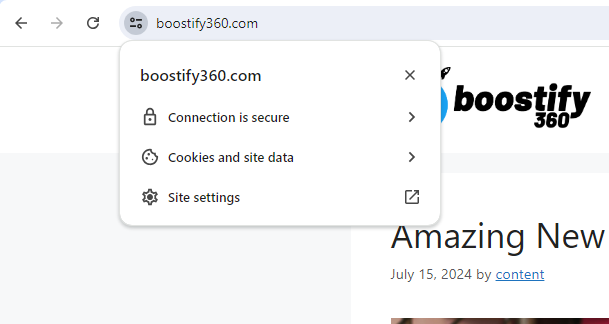
- SSL Certificate: Makes sure information sent to and from your site is encrypted.
- Strong Passwords: Use complex passwords to protect your site from hackers.
- Regular Updates: Keep your website’s software up to date to protect against security vulnerabilities.
Optimize for Mobile
Many people browse the web on their phones, so your site needs to look good and work well on mobile devices. This is called mobile optimization. Most website platforms have mobile-friendly themes, but it’s still a good idea to check how your site looks and functions on a phone. Here are some tips:
- Responsive Design: Ensure your theme automatically adjusts to different screen sizes.
- Fast Loading Times: Mobile users don’t like to wait, so make sure your site loads quickly.
- Easy Navigation: Menus and links should be easy to click on a small screen.
Step 2: Conduct Research
Research Customers
To create a website that people love, you need to understand who your customers are and what they want. This is like finding out what kind of house your guests will feel comfortable in. Here’s how to research your customers:
- Look at Forums and Social Media: See what questions people are asking and what problems they need solving.
- Read Reviews: Customer reviews can give you insights into what people like and dislike.
- Create Customer Profiles: Think about your ideal customer. How old are they? What are their interests? What problems do they have?
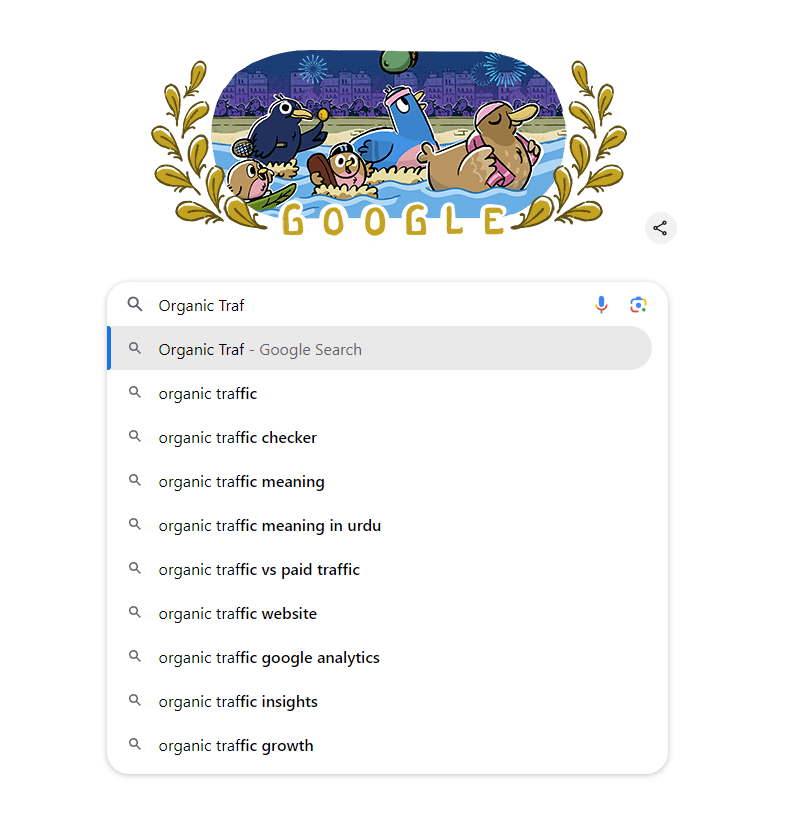
- Google autocomplete: As you type a query into Google, it will suggest related searches based on search popularity.
Research Competitors
To stand out, you need to know what your competitors are doing. This is like visiting other houses to see what’s working well and what’s not. Here’s how to research your competitors:
- Search for Keywords: Look for the keywords you plan to use and see who comes up in the results.
- Analyze Their Websites: Take notes on what you like and don’t like about their sites.
- Identify Gaps: Find out what your competitors are missing and see how you can fill that gap.
Research Keywords
Keywords are the words and phrases that people type into search engines when they’re looking for information. For example, if you have a website about gardening, some keywords might be “how to grow tomatoes” or “best garden tools.” Here’s how to find the right keywords:
- Use Keyword Tools: Tools like Google Keyword Planner can show you which keywords are popular.
- Look for Long-Tail Keywords: These are longer, more specific phrases like “how to grow tomatoes in a small garden.” They might have lower search volume but are often less competitive.
- Check Search Volume and Competition: Choose keywords that have a good balance between high search volume and low competition.

Step 3: Structure Your Website
Create a Site Architecture
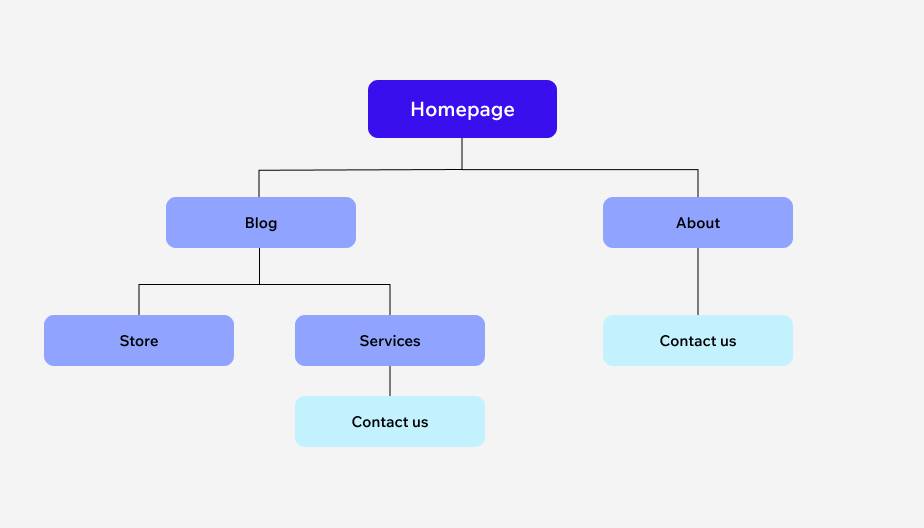
Site architecture is the way your website’s pages are organized. A good structure makes it easy for visitors to find what they’re looking for and helps search engines understand your site. Think of it as the floor plan of your house. Here’s how to create a good site architecture:
- Main Menu: Include your most important pages like Home, About, Services, and Contact.
- Sub-Pages: Under each main page, have sub-pages for more detailed information.
- Clear Navigation: Make sure it’s easy for visitors to move around your site.
Use Clear URLs
Your URLs should be clear and descriptive. Instead of www.yoursite.com/page1, use www.yoursite.com/gardening-tips. This helps visitors and search engines understand what each page is about. Here’s how to create clear URLs:
- Keep Them Short: Short URLs are easier to remember and share.
- Use Keywords: Include relevant keywords to describe what the page is about.
- Avoid Special Characters: Stick to letters, numbers, and hyphens.
Plan Your Content
Decide what content you need for each page. For example, your Home page might have a welcome message, some information about what your site offers, and links to your most important pages. Here’s a basic content plan for a few common pages:
- Home Page: Welcome message, site overview, and links to key pages.
- About Page: Information about you or your business, your story, and your mission.
- Services Page: Detailed descriptions of what you offer, with benefits and features.
- Contact Page: Contact form, email address, phone number, and maybe a map if you have a physical location.
Make It Easy to Navigate
Your site should be easy to navigate. Visitors should be able to find what they’re looking for without too much effort. Here are some tips for easy navigation:
- Use Clear Headings: Headings help visitors understand what each section of a page is about.
- Simple Menus: Keep your menus simple and organized.
- Search Bar: If you have a lot of content, add a search bar to help visitors find what they need quickly.
Step 4: Create SEO Content
Creating content that ranks well in search engines is like decorating your house in a way that makes it attractive to visitors. Here’s how to create effective SEO content:
Match Search Intent
Search intent is the reason behind a search query. It’s important to understand what people are looking for when they use certain keywords and to create content that matches this intent. There are different types of search intent:
- Informational: The user wants to learn something (e.g., “how to plant tomatoes”).
- Navigational: The user is looking for a specific website (e.g., “Facebook login”).
- Transactional: The user wants to buy something (e.g., “buy garden tools”).
Make sure your content matches the type of intent behind the keywords you’re targeting.
Target Keywords
Choose a primary keyword for each piece of content. This is the main topic your content will be about. Use this keyword in important places like the title, headings, and throughout the content. Also, use related keywords and phrases to help search engines understand the context of your content.
Use E-E-A-T Signals
E-E-A-T stands for Experience, Expertise, Authoritativeness, and Trustworthiness. These are signals that help search engines determine the quality of your content. Here’s how to improve E-E-A-T:
- Experience: Show that you have hands-on experience with the topic.
- Expertise: Provide detailed, accurate information. Cite sources and include author bios.
- Authoritativeness: Get backlinks from reputable sites.
- Trustworthiness: Use secure connections (HTTPS), and provide clear contact information and policies.
Structure Your Content
Well-structured content is easier for both visitors and search engines to understand. Here’s how to structure your content:
- Use Headings and Subheadings: Break your content into sections with clear headings.
- Write Short Paragraphs: Keep paragraphs short and to the point.
- Use Bullet Points and Lists: Lists make information easy to scan.
- Include Images and Videos: Visuals can make your content more engaging and easier to understand.
Step 5: Implement On-Page SEO
On-page SEO involves optimizing individual pages on your website to rank higher and earn more relevant traffic. It’s like arranging the furniture in your house so that it’s both functional and attractive. Here’s how to implement on-page SEO:
Title Tags
The title tag is one of the most important on-page SEO elements. It’s the clickable headline that appears in search engine results. Here’s how to optimize your title tags:
- Include Your Primary Keyword: Put your main keyword near the beginning of the title.
- Keep It Under 60 Characters: Titles that are too long may get cut off in search results.
- Make It Compelling: Write a title that makes people want to click.
Meta Descriptions
The meta description is a brief summary of a page that appears under the title in search results. Here’s how to write a good meta description:
- Include Your Primary Keyword: Use the main keyword and related keywords.
- Keep It Under 160 Characters: Meta descriptions that are too long will be truncated.
- Make It Engaging: Write a description that encourages people to click.

Internal Links
Internal links are links that point to other pages on your website. They help search engines understand the structure of your site and can keep visitors on your site longer. Here’s how to use internal links effectively:
- Use Descriptive Anchor Text: The text you use for the link should describe the page it’s linking to.
- Link to Relevant Pages: Make sure the pages you’re linking to are related to the content of the current page.
- Don’t Overdo It: Too many links can be distracting and may look spammy.
Optimize Images
Images can make your content more engaging, but they need to be optimized for SEO.
Here’s how to optimize your images:
- Use Descriptive File Names: Name your image files something descriptive, using keywords if possible.
- Add Alt Text: Alt text is a description of the image that helps search engines understand what it’s about.
- Compress Images: Large images can slow down your site. Use tools like TinyPNG to reduce the file size without losing quality.
Step 6: Establish Credibility and Earn Backlinks
Backlinks are links from other websites to your site. They act like votes of confidence, showing search engines that your site is trustworthy and authoritative. Earning backlinks is like getting recommendations from others who admire your house.
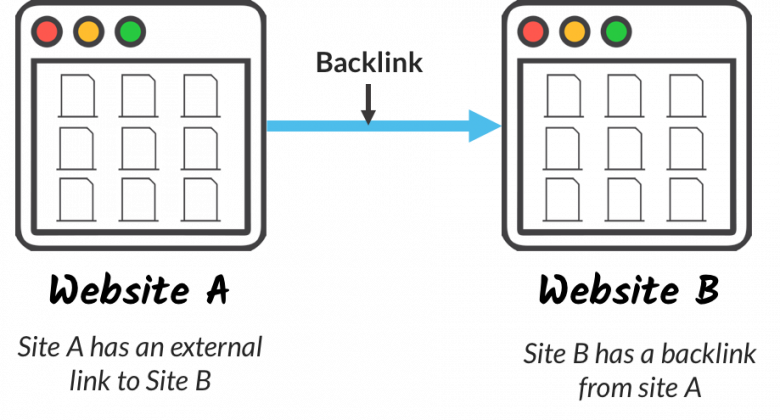
Here’s how to establish credibility and earn backlinks:
Create High-Quality Content
The best way to earn backlinks is to create content that people want to link to. Here are some types of content that tend to attract links:
- In-Depth Guides: Comprehensive guides on a particular topic.
- Original Research: Data and studies that provide new insights.
- Infographics: Visual representations of data that are easy to share.
- List Posts: Lists of tips, tools, or resources.
Promote Your Content
Once you’ve created great content, you need to promote it to earn backlinks. Here are some ways to promote your content:
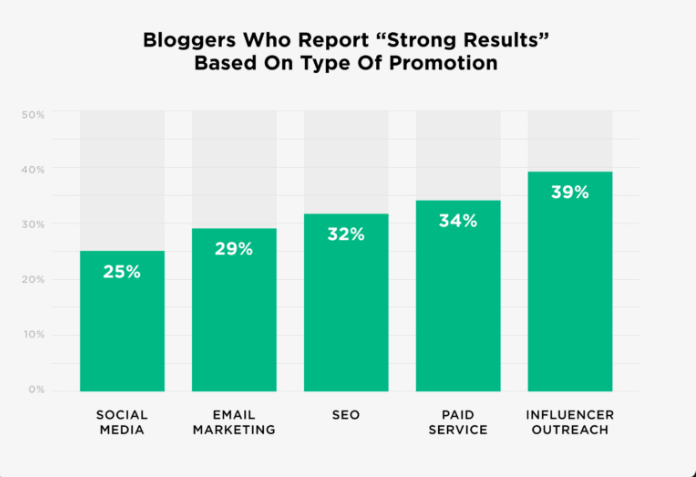
- Reach Out to Influencers: Contact bloggers and influencers in your niche and ask them to share your content.
- Guest Blogging: Write articles for other websites and include links back to your site.
- Social Media: Share your content on social media platforms.
Build Relationships
Building relationships with other website owners and influencers can help you earn backlinks. Here’s how to build relationships:
- Engage on Social Media: Comment on and share other people’s content.
- Attend Industry Events: Network with others in your industry at conferences and meetups.
- Offer to Help: Provide value to others by helping them with their projects or offering advice.
By following these steps, you’ll be able to create content that not only ranks well in search engines but also attracts visitors and earns valuable backlinks. Implementing on-page SEO, creating high-quality content, and promoting it effectively are key to building a successful website.
Step 7: Distribute Your Content
Creating great content is only part of the battle; you also need to distribute it so that people can find and share it. Think of it as throwing a housewarming party to show off your beautiful new home. Here’s how to distribute your content effectively:
Promote on Social Media
Social media platforms are great places to share your content and reach a wider audience. Here’s how to use social media for content promotion:
- Choose the Right Platforms: Different platforms attract different audiences. For example, Instagram is great for visual content, while LinkedIn is better for professional articles.
- Engage with Your Audience: Respond to comments and messages, and interact with other users’ posts. Engagement helps build a community around your content.
- Use Hashtags: Hashtags help people find your content. Use relevant hashtags to increase your reach.
- Schedule Posts: Use tools like Buffer or Hootsuite to schedule your posts in advance. This ensures a consistent posting schedule without having to be online all the time.
Share in Online Communities
Online communities like forums and groups can be excellent places to share your content. Here’s how to do it:
- Join Relevant Groups: Find groups and forums related to your niche. Participate in discussions and share your content when it’s relevant.
- Be Helpful: Don’t just spam your links. Provide value to the community by answering questions and offering useful information.
- Follow Rules: Make sure to follow the rules of each community. Some groups have strict guidelines about self-promotion.
Email Marketing
Email marketing is a powerful way to distribute your content directly to people who are interested in what you have to say. Here’s how to use email marketing effectively:
- Build an Email List: Encourage visitors to sign up for your email list by offering something of value, like a free ebook or exclusive tips.
- Send Regular Updates: Keep your subscribers engaged by sending regular newsletters with your latest content.
- Personalize Your Emails: Use your subscribers’ names and tailor your content to their interests to make your emails more engaging.
Step 8: Monitor Performance
After you’ve created and distributed your content, it’s important to monitor its performance to see what’s working and what’s not. This is like checking the temperature in your house to make sure it’s comfortable. Here’s how to monitor your content’s performance:
Use Analytics Tools
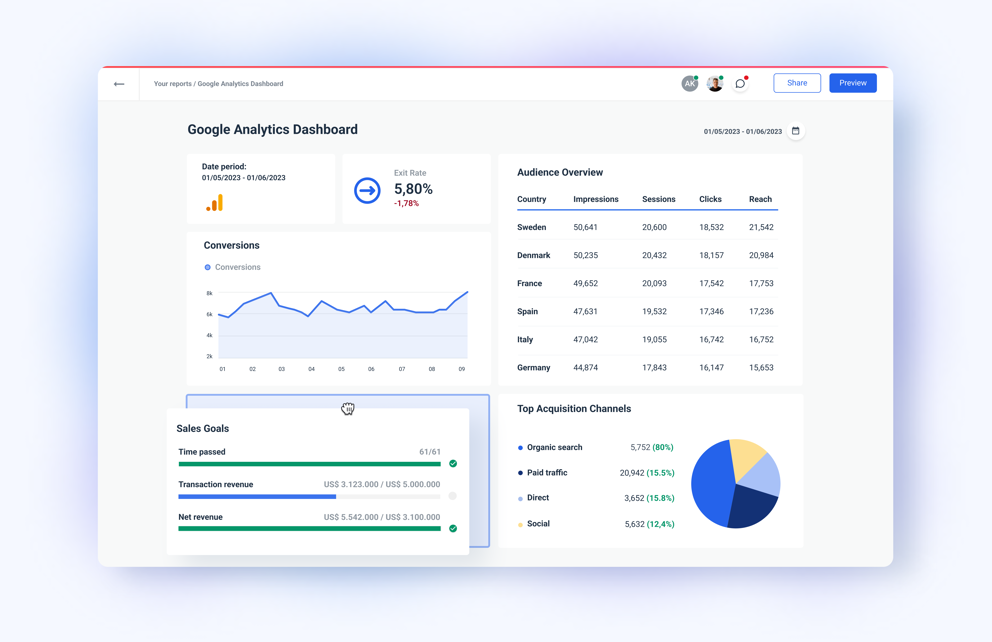
Analytics tools like Google Analytics can provide valuable insights into how your content is performing. Here’s what to look for:
- Traffic: See how many people are visiting your site and which pages are most popular.
- Bounce Rate: This is the percentage of visitors who leave your site after viewing only one page. A high bounce rate can indicate that your content isn’t engaging or that visitors aren’t finding what they’re looking for.
- Average Session Duration: This tells you how long visitors are staying on your site. Longer sessions usually mean that people are finding your content interesting and useful.
Track Conversions
Conversions are actions that you want visitors to take, like signing up for your email list or making a purchase. Here’s how to track conversions:
- Set Up Goals: In Google Analytics, you can set up goals to track specific actions, like form submissions or downloads.
- Monitor Conversion Rates: See how many visitors are converting and which pages are driving the most conversions.
- Analyze User Behavior: Use tools like heatmaps and session recordings to see how visitors are interacting with your site. This can help you identify areas for improvement.
Step 9: Adjust Your Strategy
Based on the data you’ve gathered, you may need to adjust your strategy to improve your results. This is like making renovations to your house to make it more comfortable and efficient. Here’s how to adjust your content strategy:
Identify What’s Working
Look at the data to see which types of content and distribution methods are performing best. Here’s how to do it:
- Top-Performing Pages: Identify your most popular pages and see what they have in common.
- Successful Keywords: Find out which keywords are driving the most traffic and conversions.
- Effective Channels: Determine which distribution channels are bringing in the most visitors and engagement.
Optimize Underperforming Content
If some of your content isn’t performing well, see if you can improve it. Here’s how to optimize underperforming content:
- Update Outdated Information: Make sure all the information in your content is up-to-date.
- Improve SEO: Revisit your keyword strategy and make sure you’re using keywords effectively.
- Enhance User Experience: Make your content more engaging by adding images, videos, and interactive elements.
Experiment with New Strategies
Don’t be afraid to try new things. Experimenting with different types of content and distribution methods can help you find new ways to reach your audience. Here’s how to experiment effectively:
- A/B Testing: Test different versions of your content to see which one performs better.
- Try New Formats: Experiment with different content formats, like videos, infographics, and podcasts.
- Explore New Channels: Try promoting your content on new platforms or in new communities to reach a different audience.
Step 10: Keep Learning and Improving
SEO and content marketing are constantly evolving, so it’s important to keep learning and improving. This is like continuing to decorate and renovate your house to keep it fresh and modern. Here’s how to stay up-to-date:
Follow Industry Blogs
Stay informed about the latest trends and best practices by following industry blogs and websites. Some popular ones include Moz, Search Engine Journal, and HubSpot.
Take Online Courses
Online courses can provide in-depth training on specific topics. Websites like Coursera, Udemy, and LinkedIn Learning offer courses on SEO, content marketing, and more.
Attend Conferences and Webinars
Industry conferences and webinars are great places to learn from experts and network with other professionals. Look for events like MozCon, Content Marketing World, and SMX.
Join Professional Communities
Joining professional communities can help you stay connected with other marketers and learn from their experiences. Look for groups on LinkedIn, Reddit, and other platforms.
By following these steps, you’ll be well on your way to creating a successful website that not only attracts visitors but also engages and converts them.
Setting up your website, conducting thorough research, creating high-quality content, promoting it effectively, and continually monitoring and improving your strategy are all essential components of a strong SEO and content marketing plan.
If you looking to improve your business visibility, head over to our recent blog on best AI tools for small business marketing.
Conclusion
Understanding the art of SEO copywriting can help you write content that resonates with your audience and search engines.
SEO is an ongoing process that requires patience and dedication. With consistent effort, you can steadily improve your website’s visibility, attract more organic traffic, and achieve your business goals. It’s important to have realistic expectations and not get discouraged if you don’t see immediate results. Focus on building a strong foundation by creating valuable content and understanding your audience and their needs. Over time, your efforts can lead to sustainable growth and success. .