
A good Google Maps position brings you new customers. Learn how to rank up your local business easily.
There’s no denying that in recent times, more and more business owners are wondering how to rank their company higher on Google Maps and search engines, attempting to get ahead of competitors who position high. The very fact that you came across this article confirms this.
We have a solution that can greatly improve the Google Maps profile of local businesses, boosting visibility and surpassing competitors. Boostify360 is the secret to the perfect local SEO strategy.
What is the function of a Google business profile on Google Maps?
A business profile on Google Maps performs several essential functions for business owners who own such free business profiles on Google.
The first and primary element it contains is basic data about the company, such as the address that users can easily find and use for determining the route to the company’s headquarters with a single click.
Another element is that a company’s profile on Google Maps can help business owners reach brand new customers who are unfamiliar with the company and its services or products. It happens when they come across it by searching the Internet for the answer to their needs, which could be, for example, finding a restaurant, shoe store, laundromat, and so on.
If you have a business, realize that this is a critical marketing channel, but you need to take care of it, and you are about to learn how to do it and increase your Google Maps ranking.
Verification of your Google Maps listing
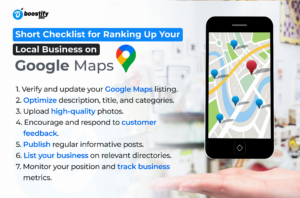
You need to know that you can’t do anything without access to your business profile on Google Maps, and the first thing you should do is verify that you own a specific business profile on Google Maps.
Just type in “my business” into Google and see if it shows you the business that you manage. If not, you probably don’t have access to your business (or you don’t have access to that email address), and you’ll need to either change the Google account you’re logged into or attempt to take over your business profile.
How can I improve my Google Maps business listing in local search results?
Despite appearances and with the available tools, this process is not complicated, time-consuming, or expensive. We will show you how to take care of your business profile in a few steps to increase your ranking in Google Maps.
Take care of the basic information at the beginning
The first and one of the most important elements is what your Google Maps profile contains. Verify if the address, phone number, logo, and website are correct because, for example, an error in the phone number can result in no calls to the company.
Add and optimize the company description

The description is one of the elements you need to pay attention to when trying to increase your company’s visibility on Google Maps. Check if you have a company description added and if so, try to verify that it is optimized – if it contains words that will give you a competitive advantage and increase your ranking in Google Maps.
You can ask the artificial intelligence to create your business suggestions for your business description.
Make sure you have the Right Title

The title is one of the main ranking factors you cannot overlook. Be sure to include your branding or so-called company name, but you may be tempted, with common sense, to add 1-3 words that can increase your company’s visibility in Google Maps.
Try to make sure your title is long enough so that your company’s name appears in it, and you can also include some of the most popular words your competitors are using. Remember not to make it look like spam.
Set the Perfect Primary Category (❗)
The main category is fundamental for increasing your ranking on Google Maps, and you should approach it with head and responsibility. Set as your primary category the one that best fits your business. Focus on this one – it’s really important.
Add Appropriate Additional Categories

The next element is the secondary categories, which are a little less important than the main category but still significant enough to increase or decrease your company’s ranking in Google Maps. Set as secondary categories those that fit your business and what you do.
Complete the number of photos, and don’t let your competitors overtake you.
Photos are essential for two reasons. The first is that they influence customers’ decisions about which company to choose, and the second is that they affect a company’s position on Google Maps. In a nutshell, it looks like the more high-quality photos in a profile, the higher the ranking.
Get Feedback from Customers

Customer feedback is one essential element that is not the easiest to fulfill. Remember that to increase your company’s ranking on Google Maps, you should regularly solicit reviews, especially if you have too few of them compared to your competitors.
Remember that your competition is working, and the guidelines may be completely different and more demanding in a week or a month. Act now!
Respond to feedback from customers
Getting reviews for the Google Maps listings is very important, but it’s equally important to write back to the reviews left by customers on your company’s Google Maps profile.
Suppose you want to enjoy a high ranking in Google Maps and the trust of new customers. In that case, you should show them that you care about the company’s reputation and it is crucial to you, and you can do this by writing back to the reviews left in your company profile.
Publish posts to your company profile

Publishing posts is one of the things you should do thoughtfully and regularly. With the posts and the regularity of publishing them, your company profile and Google contain a great deal of information about your company and its services, allowing you to rank your business high on Google Maps and reach thousands of new customers.
With it, you can quickly create several entries and schedule them to be automatically published every week, two, month… whenever you want.
You can ask the artificial intelligence to create a post suggestion for your business.
Add Information about Your Business in Business Directories
A high ranking and position in Google Maps is not only because you operate within your Google business profile but also because of what happens outside your business profile. That’s where the business directories play a critical role.
Try to publish information about your business on valuable and topical sites with business directories and feature your competitors.
Automatically Monitor your Company’s Position
Every action you take, you should carefully track and verify if and how it translates into the company and its increased visibility and ranking on Google Maps.
Ready business development statistics
As you increase your position in Google Maps, you should consider how higher position and visibility translate into better business metrics.
Related: Local SEO Strategy: A Guide to Winning Strategy
Summary
Although ‘local SEO’ may sound like black magic, there’s nothing about positioning Google maps business listings that you couldn’t do. Following tips from this article, you’ll be able to rank up your local business in Google search easily.
Of course, you can do it manually on your own, but if you’re searching for a solution that will save you much time in boosting your company’s Google maps rankings, Localo tool comes to the rescue.
Good luck and happy optimizing!